Private listing memory
Property details, owner notes, media status, valuation context and document readiness stay connected to the mandate.
Apps / Service 27
Blackstone Digital designs focused macOS applications for specialist teams that need faster desktop work, clearer ownership and controlled rollout. The luxury real estate CRM case study below shows how a Mac app can turn a high-value workflow into one operating surface without limiting the service to one industry.
Overview
A macOS application is strongest when a browser workflow is too fragmented for how the team actually works. Blackstone Digital builds focused desktop tools around local files, structured records, review states, reporting, permissions and support routines. The PrimeEstate example on this page demonstrates the pattern through a luxury real estate workflow, but the same operating logic applies to finance, operations, advisory, document review and internal admin tools.
Desktop workbench preview
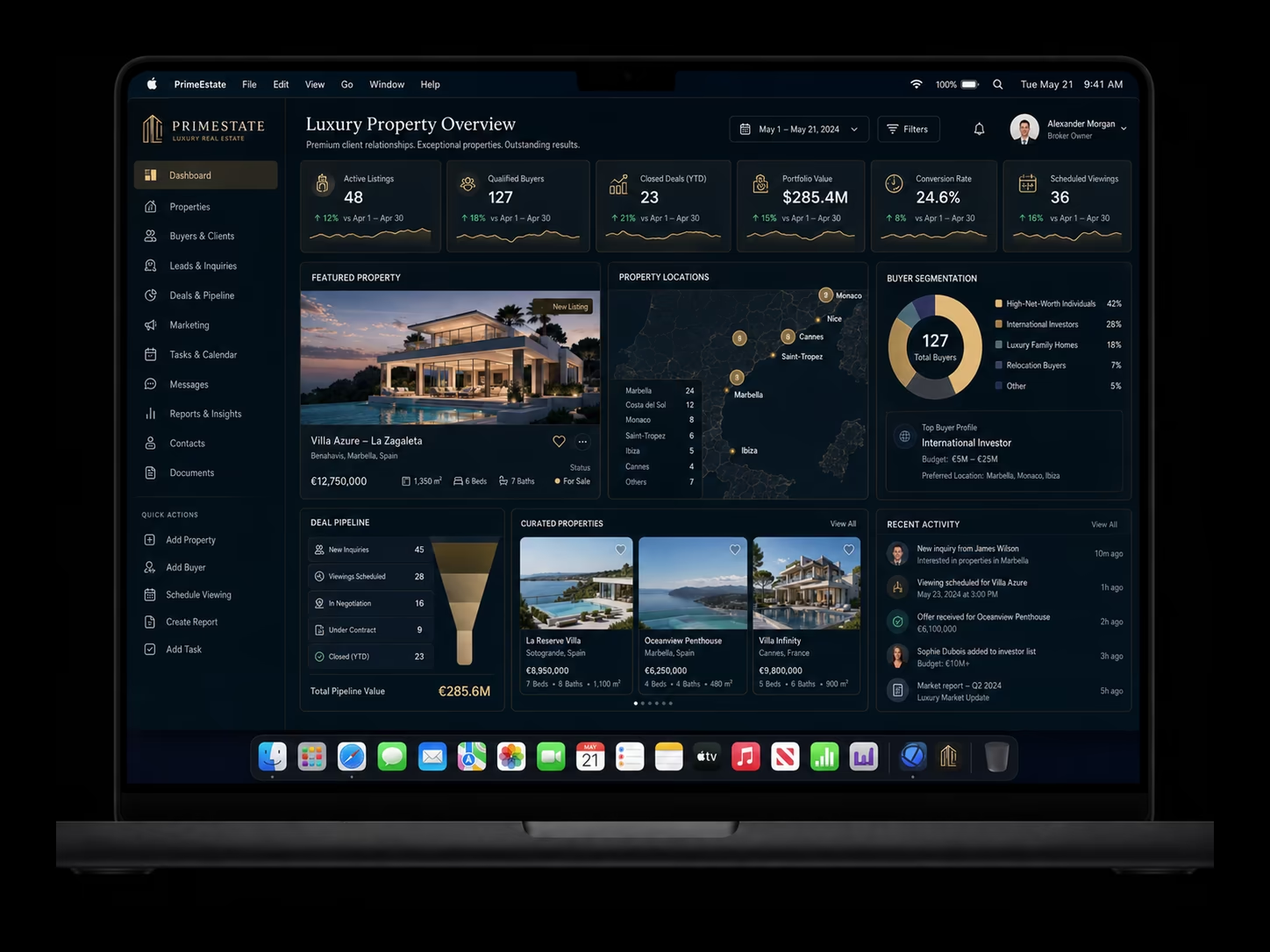
Case study: Luxury Real Estate CRM
This page uses a luxury real estate workflow as a concrete case study because it makes the value of a native Mac app easy to see: property context, buyer intent, viewing history, documents, offer status and next actions belong in one focused desktop workbench instead of being spread across inboxes, spreadsheets and browser tabs.
Property details, owner notes, media status, valuation context and document readiness stay connected to the mandate.
Brokers see buyer fit, budget range, preferences, source, last touch and next step before follow-up.
Appointments, feedback, negotiation status and decision blockers remain visible without rebuilding context.
Leadership gets a focused view of active inventory, pipeline value, buyer movement and stalled work.
Brokerage value promise
Luxury real estate is the example, not the limit. The same Mac workbench pattern applies whenever specialist teams need records, files, review states, reporting and governance in one controlled desktop tool.
Case study scope
The PrimeEstate example shows how Blackstone Digital scopes a native desktop tool: name the records, decisions, files, roles, review states and reporting signals before development expands. In another industry, these same patterns could become document operations, advisory review, finance reporting or internal admin control.
In the case study, listing facts, owner notes, media status, valuation context and document readiness sit in one structured record.
Budget, location preference, lifestyle requirements, advisor context and last interaction become visible before follow-up.
Active listings, private opportunities, buyer matches, offer stage and blockers are grouped by owner and next action.
Private showings, advisor appointments, concierge requests and follow-up windows avoid scattered calendars and notes.
Floor plans, disclosures, contracts, valuation notes and marketing packs stay linked to the right property and client.
Sensitive price changes, counteroffers and client commitments can move through visible approval states.
Reminders and relationship prompts show which buyers, sellers or advisors need attention next.
Brokerage leadership sees active inventory, pipeline value, buyer movement and stalled mandates.
Clean records and permissions make later AI assistance useful without exposing private client context casually.
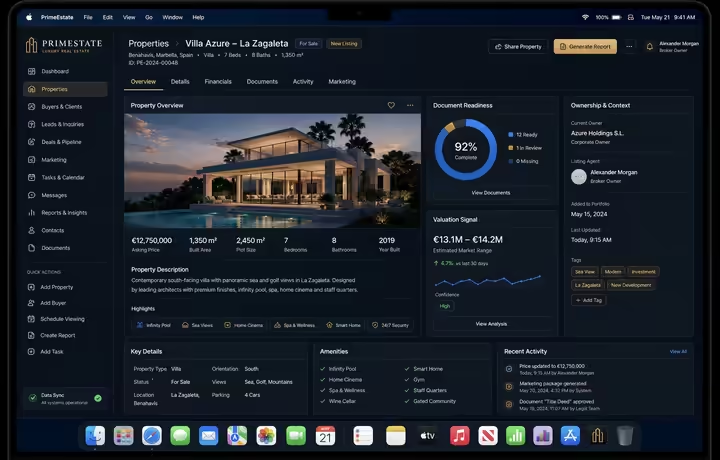
Listing details, owner context, media status, document readiness and value notes remain tied to the mandate.
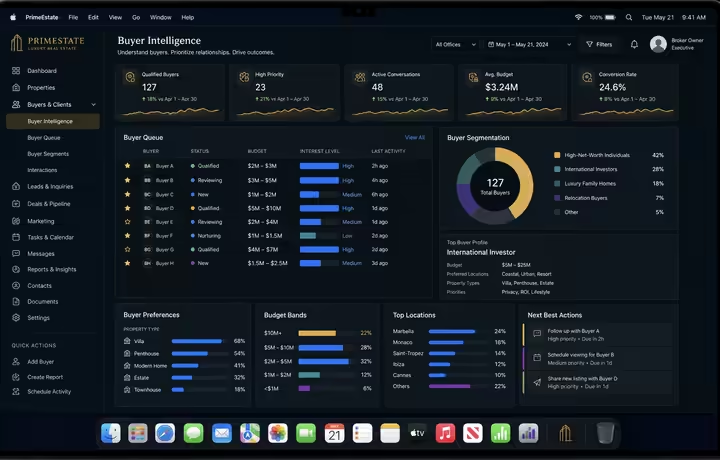
Buyer fit, budget band, location intent, advisor context and priority follow-up are visible before the next call.
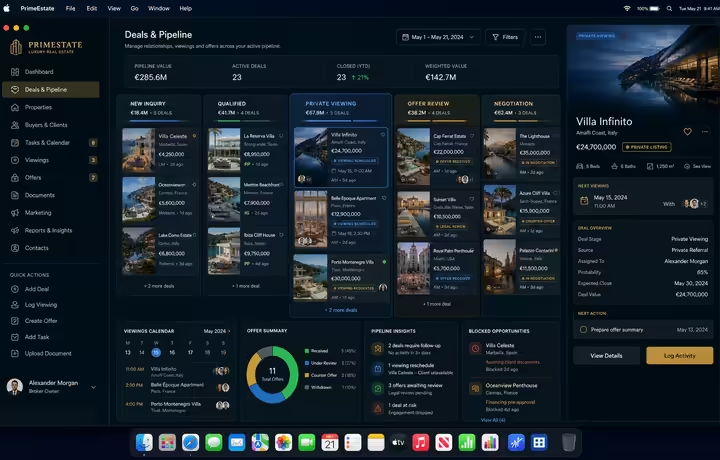
Viewings, offers, blockers and curated opportunities move through one visible operating path.
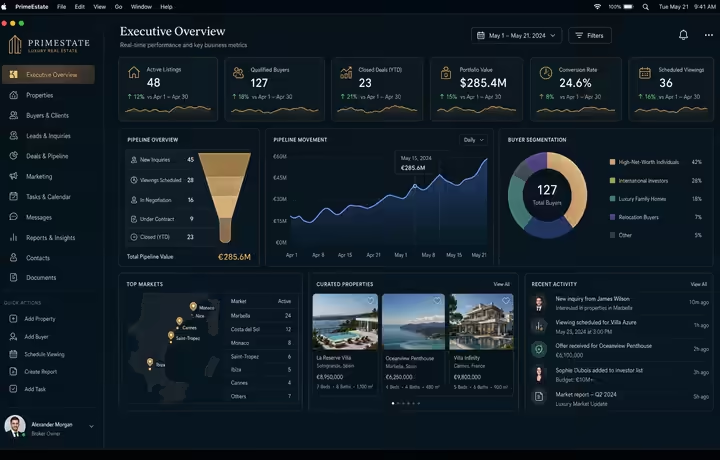
Leadership sees active inventory, closed deals, conversion and portfolio value without rebuilding context from exports.
Mac app investment case
The PrimeEstate CRM is a case study, not a category limit. It shows the type of workflow where a native Mac app can be worth the investment: high-value records, local files, relationship context, review states, reporting and follow-up all matter enough to deserve one controlled workbench.
If the job is mostly shared access, Blackstone Digital may recommend a web app first. If the job is mostly background routing, automation may be enough. The Mac app case becomes stronger when desktop focus, local context, fast review and managed rollout directly affect the value of the work.
Generic CRM or spreadsheet
A generic CRM or spreadsheet can be enough when the job is simple record storage, light follow-up and low operational risk. It is weaker when context, documents, approvals and private-client work need one disciplined surface.
Choose this when the workflow does not yet justify a custom operating surface.
Web portal or automation
A portal or automation workflow is stronger when the value is remote access, customer updates, reminders, routing, document preparation or alerts. It may not solve a broker, analyst or specialist team's focused desktop work.
Choose this when movement and access matter more than native desktop focus.
Native Mac workbench
A macOS app becomes justified when local files, review quality, reporting, deal context or admin controls are central to the work. The value is not another window; it is one controlled operating surface for a repeated high-value job.
Choose this when a dedicated Mac experience can reduce friction, improve decisions and support rollout discipline.Decision matrix
| Decision factor | Generic CRM / spreadsheet | Web portal / automation | Native Mac workbench |
|---|---|---|---|
| Best commercial use | Use it when simple contact, listing or task records are enough and workflow value is still unproven. | Use it when clients, partners or staff need access, updates, reminders or routing outside the desktop. | Use it when a high-value specialist workflow needs local files, native speed, review states and focused controls. |
| Case study example | A brokerage tracks contacts, properties and notes but still manages decisions in email and spreadsheets. | Buyer updates, reminders, document preparation and viewing notifications move in the background. | The broker team uses one Mac surface for listings, buyer fit, viewing pipeline, documents and portfolio reporting. |
| Buyer value | Low-cost structure and faster first organization. | Less repeated handling and better customer or staff handoff. | Higher focus, faster review and clearer ownership where the work already happens on the desktop. |
| Operational depth | Records, lists, notes, ownership and basic pipeline fields. | Triggers, routing, reminders, document preparation, sync, alerts and exception paths. | Native windows, sidebars, local file flows, review queues, inspector panels, exports and managed updates. |
| Investment rationale | Spend is justified when the team needs structure before deeper workflow investment. | Spend is justified by reducing manual effort, delays and missed follow-up. | Spend is justified by protecting high-value workflow time, decision quality and client relationship context. |
| Risk and readiness | Risk is duplicate data, stale records and weak process discipline. | Risk is unclear rules, missed exceptions or automation without human review. | Risk is distribution, permissions, signing, notarization, update cadence and support ownership. |
| Blackstone recommendation | Use it as a starting point when the workflow is not yet mature enough for a custom app. | Choose it when movement and handoff create more value than a dedicated desktop interface. | Commission it when native desktop context is part of the business value, not a cosmetic preference. |
Decision scale
The main job is to organize records, owners, notes and simple pipeline visibility.
The main job is background routing, reminders, document preparation, client access or escalation.
The work depends on local files, focused review, reporting, private context or specialist controls.
Signing, notarization, permissions, distribution, updates, support and measurement are ready before launch pressure.
Case study value signals
The luxury real estate example uses brokerage metrics because they are easy to understand. The same KPI structure applies to other Mac apps: define the workflow, measure handoff quality, expose exceptions and prove whether the desktop tool is worth expanding.
In the case study, this shows whether buyer context is captured quickly enough for premium follow-up.
Turns relationship quality into an operating signal instead of relying on memory or scattered inbox flags.
Connects appointments, feedback and negotiation state so the app supports deal velocity rather than just record storage.
Gives leadership a real operating view of high-value opportunities without rebuilding reports from exports.
Protects quality where property packs, disclosures, floor plans or deal materials affect client trust.
Keeps the value case connected to premium relationship management, not cosmetic application polish.
Deployment and governance readiness
Blackstone Digital plans the desktop app as an operating product: how it is installed, trusted, updated, supported, measured and governed after the first useful release.
Distribution path
Mac App Store, Developer ID, custom/private distribution or managed rollout is selected around the real audience and support model.
Signing, notarization, permissions and install expectations are planned before users are asked to rely on the tool.
Versioning, release notes, feedback, fix-forward routines and support ownership are part of the first phase.
Roles, sensitive actions, logs, review states and data boundaries are clear enough for the app to expand responsibly.
Digital Systems Review
A review phase can sort the existing website, documents, forms, spreadsheets, customer questions and workflows, then turn them into the first useful build.