Structured intake
Forms, email and staff entry become usable records instead of scattered messages.
Automation / Service 04
Blackstone Digital builds controlled automation for intake, routing, reminders, document preparation, approvals, alerts and follow-up, so repeated work moves faster while staff still own the decisions that matter.
Overview
The best automation is visible enough to trust. Staff should be able to see what was captured, where it went, what was prepared, what needs review and which exceptions need action.
Automation workflow system preview

Automation workflow system
Blackstone Digital maps the repeated operational path first, then builds the smallest controlled automation layer that can capture requests, route work, prepare outputs, protect review moments and expose exceptions.
Forms, email and staff entry become usable records instead of scattered messages.
Requests move to the right owner, tool or queue with rules staff can understand.
Confirmations, PDFs, summaries and drafts are prepared from trusted fields.
Customers and staff receive timely prompts before work goes stale.
Sensitive sends, quote changes and customer commitments wait for human review.
Failed syncs, missing data and delayed approvals become visible.
Teams see what needs action without rebuilding context from inboxes and chat.
CRM, spreadsheets, calendars, portals, email and dashboards connect around rules.
Cycle time, quality and follow-up completion show whether automation is working.
Human-in-control boundary
The workflow should move repeated work faster without turning responsibility into a black box. Review gates, exception states, fallback paths and measurement signals stay visible from the first release.
Automation operating case
Most teams do not need a giant automation platform first. They need one controlled workflow that removes repeated handling while keeping evidence, review and fallback paths visible.
The value case is operational control: fewer repeated touches, clearer ownership, faster handoff, visible exceptions and better evidence for where to expand next.

Intake and routing
Replace copied messages and improvised spreadsheets with a controlled intake layer: each request becomes a structured record with source, priority, owner, queue, SLA and next action. The team can see what arrived, what is waiting, who owns it and which rule moved it there, so exceptions are handled before work disappears into private inboxes or gets rebuilt in another tool.
Commission this first when weekly volume, missed handoffs or disputed ownership create delay that leadership cannot measure. The sales case is speed-to-response, cleaner accountability and a reusable foundation for later automation.
Documents and approvals
Turn recurring document preparation into a governed production flow: approved fields can populate PDFs, confirmations, summaries, emails and internal notes, while sensitive outputs pause for review before release. Staff stop retyping the same information and managers keep the approval trail, source data and final customer record visible enough for quality checks, audit questions and continuous improvement.
Commission this when manual document work consumes expert time, creates correction cycles or exposes the business to version, approval or compliance risk. The value case is fewer errors, faster release and a stronger evidence trail.
Alerts and follow-up
Build a follow-up layer that turns dates, statuses and waiting states into visible action. Reminders, owner alerts, escalation rules and customer updates are triggered from the workflow record, so the team sees what is due, what is blocked and what needs judgment. Customers experience fewer silent gaps, while leaders gain a clearer view of service reliability.
Commission this when missed reminders, late responses or hidden escalations damage trust. The commercial case is retention protection, reduced service noise and a measurable cadence for keeping commitments.Decision matrix
| Decision factor | Manual process | Generic automation tool | Blackstone controlled automation workflow |
|---|---|---|---|
| Request capture | Messages and files are collected manually. | Triggers start tasks, but context can stay thin. | Structured records capture context, owner and evidence from the start. |
| Routing | Staff decide where work goes each time. | Rules can route tasks, but exceptions often stay hidden. | Routing logic shows owner, queue, rule and fallback path. |
| Document preparation | Staff rebuild drafts, PDFs and confirmations. | Templates can run, but review and source fields may be unclear. | Documents are prepared from trusted fields with review before release. |
| Approvals | Approvals happen in inboxes or after the fact. | Approval steps exist, but may be detached from the customer record. | Review gates are part of the workflow before sensitive sends or changes. |
| Exception handling | Failures are discovered after someone complains. | Error logs exist, but business owners may not see them. | Failed syncs, missing fields and delayed approvals become operating signals. |
| Visibility | Managers ask for updates manually. | Dashboards show task counts without decision context. | Cycle time, handoff clarity and exception states are visible by design. |
| Integration | Tools stay connected by copy/paste. | Point-to-point automations can multiply hidden dependencies. | CRM, calendars, portals, email, files and dashboards connect around rules. |
| AI readiness | AI reads incomplete or inconsistent context. | AI features may run before governance is clear. | Automation creates trusted records, review moments and audit evidence first. |
| Best fit | Low-risk, low-volume work. | Simple trigger-action shortcuts. | Operational workflows where ownership, evidence and improvement signals matter. |
Automation maturity roadmap
Repeated handling, delay, owners, tools and exception points are made visible.
Records, routing, permissions, approval and fallback rules are defined.
Reminders, preparation, sync, notifications and documents move repeated work.
Cycle time, error rate, exceptions, handoff and follow-up are reviewed.
Portals, dashboards, AI assistance and deeper integrations grow from evidence.
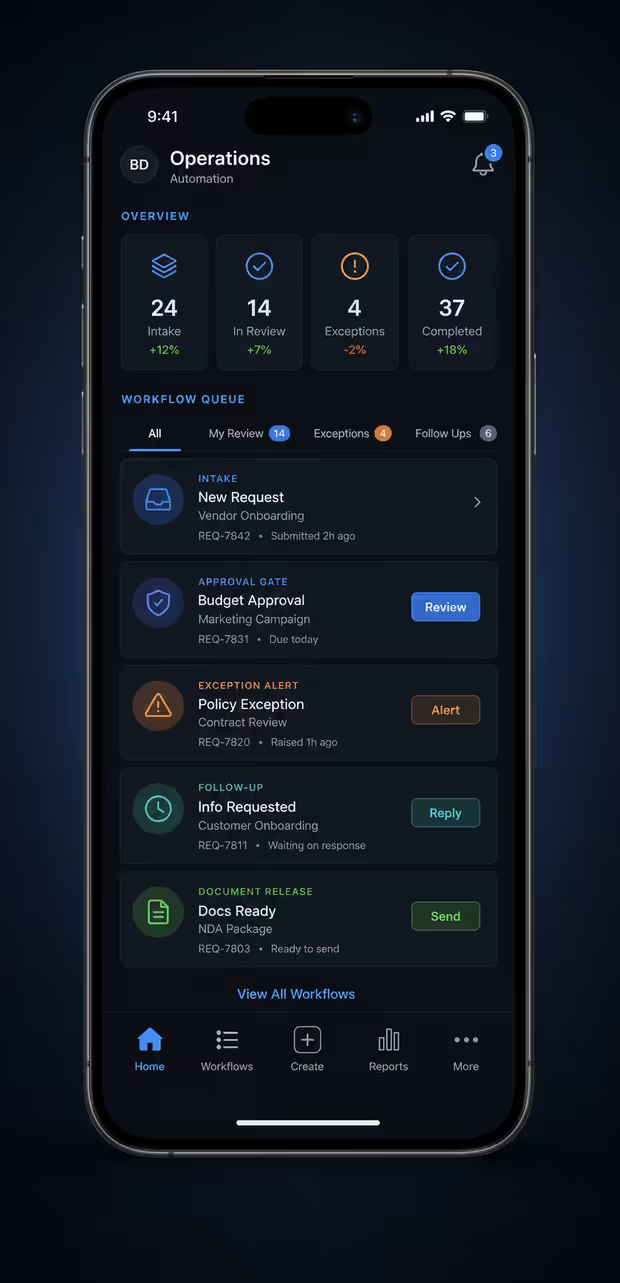
Mobile automation operations
Automation should travel with the team, but the mobile surface still needs role clarity, review moments and exception visibility. The goal is faster action without bypassing the people accountable for customer commitments.
Staff can approve sensitive sends, quote changes or document release without waiting for a desktop session.
Delayed approvals, missing fields and failed syncs stay visible to the person who can unblock them.
Due reminders can be reviewed before customers or staff receive the next prompt.
Owners see what needs follow-up and which context should travel with the message.
Prepared PDFs and confirmations can move only after the review step is complete.
Mobile alerts show whether the next action is approve, assign, fix data or escalate.
Research basis: Microsoft Work Trend Index supports interruption and follow-up pressure, IBM workflow automation supports approval and document-flow framing, and NIST CSF/AI RMF reinforce governed review and risk-control boundaries.
Digital Systems Review
A review phase can sort the existing website, documents, forms, spreadsheets, customer questions and workflows, then turn them into the first useful build.