Inquiry capture
Website forms, email leads, phone notes and partner referrals can become structured records instead of loose messages.
Systems / Service 11
Many businesses lose opportunities because inquiries, notes and follow-up live in too many places.
Overview
CRM-Light gives the team one working customer view before a full Enterprise CRM is justified. It tracks what matters now: who asked, what was discussed, who owns the next step and when follow-up should happen.
CRM-Light system preview
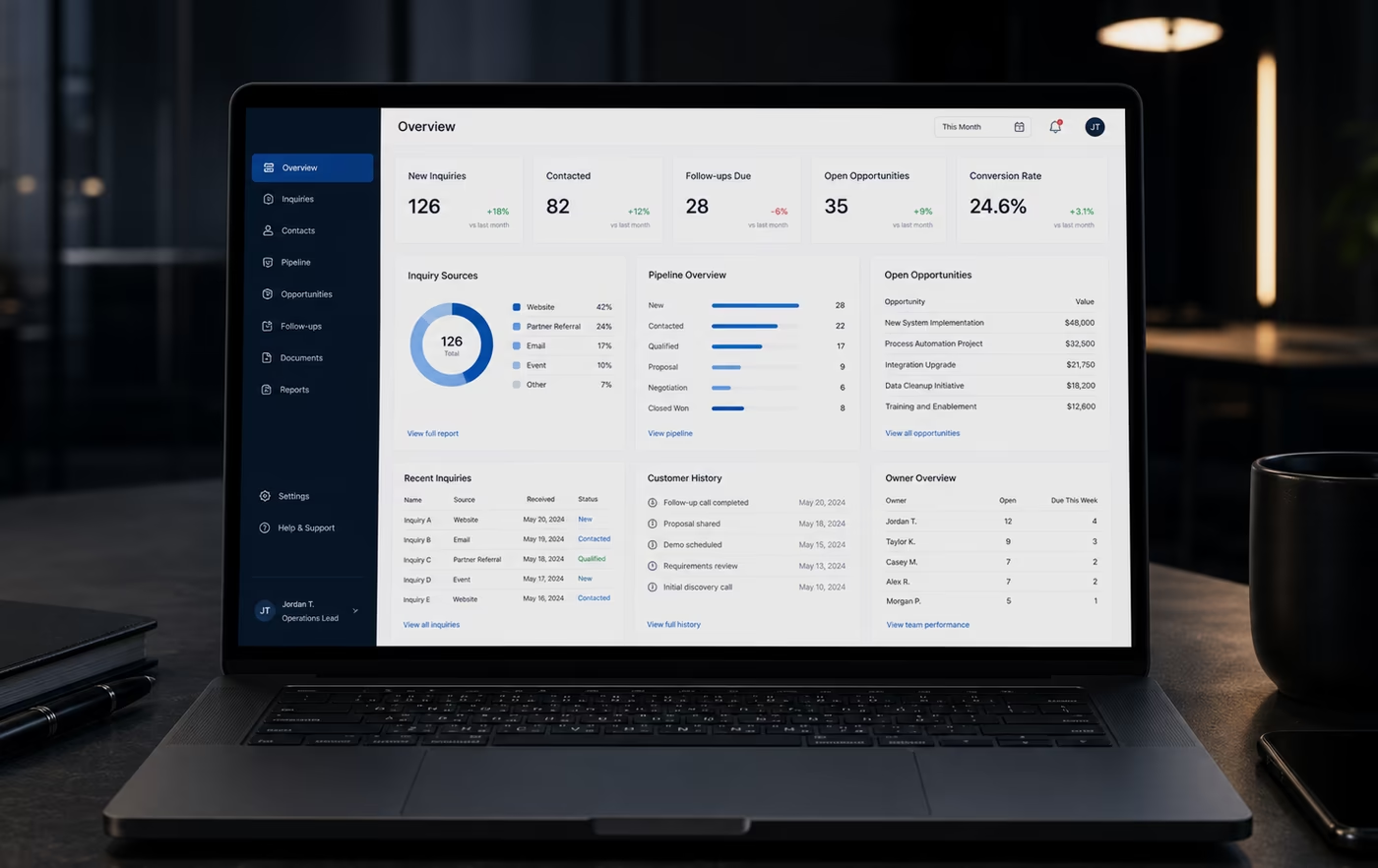
CRM-Light and customer data systems
CRM-Light is for teams that need more control than a spreadsheet, but not the weight of an enterprise CRM rollout. It gives customer work a practical record: who asked, what happened, who owns the next step and when follow-up should happen.
Website forms, email leads, phone notes and partner referrals can become structured records instead of loose messages.
Each company or person keeps the useful context: source, interest, notes, documents, owner and relationship history.
Open, contacted, qualified, proposal, waiting and closed states make follow-up visible before opportunities disappear.
Every customer record can show who owns it, what should happen next and when the next review is due.
Calls, quotes, PDFs, requirements, decisions and handover notes stay attached to the relationship instead of separate folders.
The team can see new inquiries, active opportunities, stuck follow-ups and quote status without rebuilding the story from inboxes.
Previous conversations, next steps and decisions stay visible when work moves between people or when a customer returns months later.
A lean record model can later support dashboards, reminders, private service areas or controlled AI assistance when the workflow is stable.
If the business later needs a governed CRM platform, the CRM-Light record model gives Blackstone Digital a cleaner starting point for roles, reporting, integrations and migration.
CRM-Light boundary
CRM-Light is the first controlled customer data layer: one useful record, one follow-up rhythm and one small-team operating view. Enterprise CRM is the next level when account hierarchy, permissions, lifecycle automation, cross-team reporting, auditability and reviewed AI support need governance.
CRM-Light strategy case
A small business can lose serious opportunities long before it needs a full enterprise CRM. The real gap is usually simpler: inquiries, notes, quotes, documents and follow-up dates are spread across tools that do not create one trusted record.
The value is control without overload. A strong CRM-Light system makes customer work visible, keeps ownership clear and gives the business enough structure to improve response, reporting and later automation.
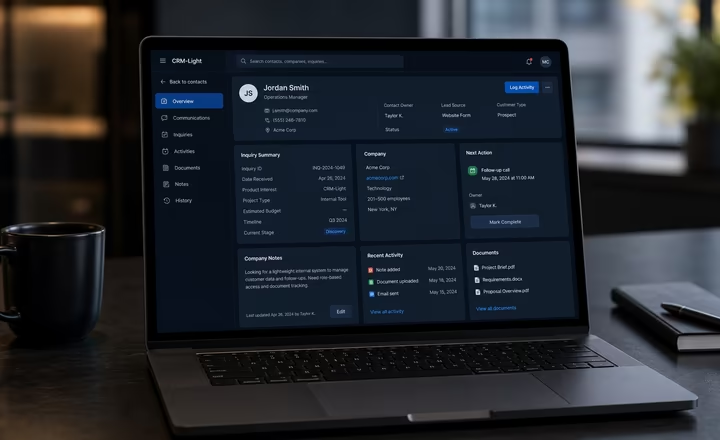
Contact records surface
Blackstone Digital structures the minimum useful record around how your team actually qualifies and serves a customer. Contact details, company context, inquiry source, service interest, notes, documents, owner, status and next action sit together, so the first response and every later handover start from the same truth. The record stays intentionally lean: enough structure to prevent lost context, without forcing the team into fields nobody maintains.
Commission this when customer information is technically captured somewhere, but the team still has to search across sheets, inbox labels, chats and memory before it can respond with confidence. The first build should make the everyday customer record reliable before expanding into reporting or automation.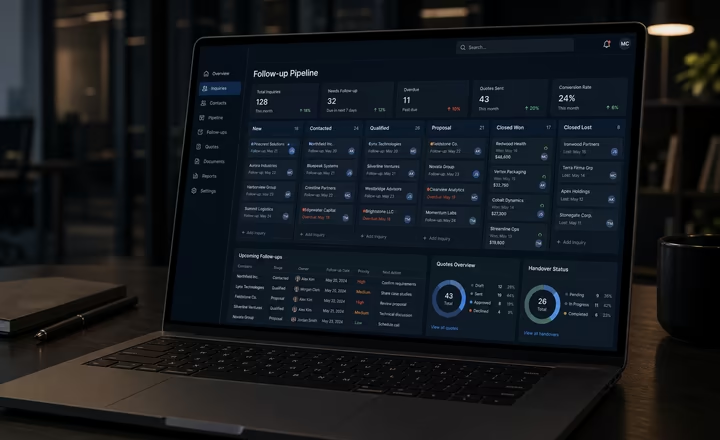
Follow-up pipeline surface
A focused pipeline turns follow-up into a visible operating rhythm. New inquiries, contacted leads, qualified opportunities, proposals, overdue actions, quote status and owner responsibility can be reviewed together, so managers see where momentum is slowing before a good lead goes cold. The system can separate real opportunities from noise and show which customer conversations need action today, this week or after a specific decision.
Commission this when good leads disappear after the first reply, follow-up depends on individual discipline or managers cannot quickly see which opportunities need action this week. The value is not more pipeline decoration; it is a practical operating view that makes response gaps and stalled quotes visible early.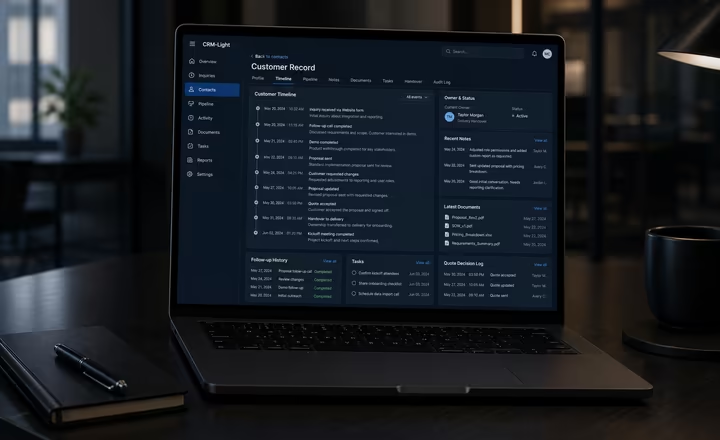
Customer history surface
Customer history should stay attached to the relationship, not to the person who last handled it. Calls, notes, documents, tasks, owner changes, quote decisions and follow-up outcomes become a readable timeline, so returning customers and internal handovers do not reset the conversation. A useful history view also protects the business when team members are away, roles change or a long-running opportunity comes back months later.
Commission this when the business has valuable customer context, but that context is held by one person, one inbox or one spreadsheet that cannot support reliable handover. The first phase should make the customer story reviewable before adding dashboards, reminders or private service areas.Customer data decision signals
The signals point to a practical operating problem: customers expect relevant, connected and fast responses, while most teams still fight fragmented application and data handoffs.
Source context: McKinsey personalization research, Salesforce CRM overview and Zendesk CX Trends 2026. These are planning signals, not guaranteed outcomes.
Decision matrix
| Decision factor | Spreadsheet | Enterprise CRM platform | Blackstone CRM-Light system |
|---|---|---|---|
| Customer record | Stores rows, but context, notes, files and next actions often drift into separate tools. | Creates a governed account and contact model across sales, service and management, often with hierarchy, permissions and required fields. | Defines the smallest useful record around the fields the team actually needs now. |
| Follow-up | Dates and reminders are easy to miss when ownership changes or the sheet is not reviewed daily. | Runs broader lifecycle stages, automation, service expectations and reporting when several teams depend on the same CRM process. | Makes stages, owners and due dates visible in the same place as the customer context. |
| History | Important notes can remain in inboxes, chat threads or individual memory. | Centralizes multi-team sales, service and communication history with stronger governance and audit expectations. | Keeps notes, documents, quotes, actions and handover context attached to the relationship without overbuilding. |
| Management view | Managers see fragments and often need manual updates to understand open opportunities. | Supports cross-team reporting, dashboards, forecasting and governed data quality once adoption and roles are mature. | Gives leadership a quick view of new inquiries, stalled follow-ups, owner gaps and quote status. |
| Adoption | Easy to start, but fragile when the workflow grows or more people need to collaborate. | Best when the organization can own configuration, permissions, lifecycle design, user training and ongoing data hygiene. | Built around the current workflow so the first version stays close to daily work and can be adopted quickly. |
| Expansion | Hard to connect safely to reminders, dashboards or workflow automation without cleanup. | Can become the central platform for integrations, workflow automation, advanced analytics and reviewed AI support. | Creates the clean record model that can later graduate into dashboards, reminders, private customer areas or Enterprise CRM. |
| Blackstone recommendation | Use this while the team is tiny and missed follow-up does not materially hurt the business. | Choose Enterprise CRM when the whole customer lifecycle needs governed roles, reporting, automation and platform ownership. | Commission CRM-Light when the first business problem is lost context, missed follow-up and small-team visibility. |
CRM-Light maturity scale
The first version captures where the inquiry came from, what the customer needs and which record should own it.
Every active relationship has a visible owner, stage, follow-up date and next step.
Notes, files, quotes, decisions and handovers stay connected to the customer instead of the person who handled it.
Clean records can later support reporting, reminders, private service areas or reviewed AI assistance.
CRM-Light FAQ
CRM-Light fits when customer work is already valuable, but the team is not ready for a heavy platform rollout. Blackstone Digital focuses the first version on one reliable customer record, owner, status, next action and history view, so the business gets control before committing to enterprise-wide CRM governance.
The first record should capture the minimum useful truth: contact and company details, inquiry source, service interest, notes, documents, owner, stage, quote or decision status, follow-up date and relationship history. The goal is not more fields; it is enough structure for the next person to understand the customer without searching inboxes and spreadsheets.
Each active record can carry an owner, stage, next action and due date. That gives managers a practical view of new inquiries, contacted leads, overdue follow-ups and stalled quotes, so missed opportunities are visible before they turn into forgotten conversations.
Usually yes, but Blackstone Digital treats import as cleanup and structure, not just a file transfer. Duplicate names, missing fields, old contacts, inconsistent stages and unclear owners are reviewed so the first CRM-Light system starts with usable data instead of carrying spreadsheet problems into a new interface.
Yes. CRM-Light can act as the cleaner operating model before a larger CRM decision. Once fields, stages, ownership and handover rules are proven in daily work, the same model can inform a later HubSpot, Salesforce or custom Enterprise CRM migration with less guesswork.
Customers increasingly expect companies to remember context, respond quickly and avoid making them repeat the same story. A CRM-Light history view helps preserve notes, files, quotes, decisions and handovers, so returning customers and active leads feel recognized rather than restarted.
Yes. A CRM-Light system can separate manager views, owner views and operational fields so customer information is useful without being overexposed. Sensitive data, AI support, dashboards and portal connections should only be added after the record model, permissions and review rules are clear.
Digital Systems Review
A review phase can sort the existing website, documents, forms, spreadsheets, customer questions and workflows, then turn them into the first useful build.